


 Notification



 Newbie


I am having trouble with almost all of my Adobe Captivate SCORM files. I am using Captivate 12.6 and viewing them on a Google Chrome browser version 141.0. My SCORM reporting is 2004.
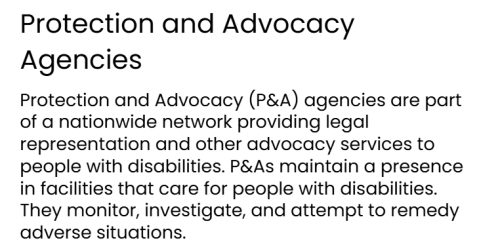
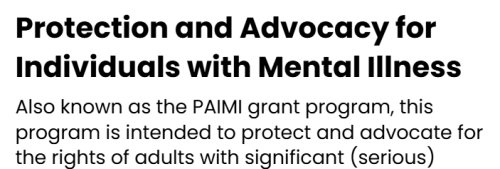
As you can see by the screenshots, my headers are sometimes published in Poppins Bold 700 and sometimes not. This happens roughly 30-40% of the time in each published project. I have repeatedly verified my theme settings for the headings and they are set correctly. It does not matter if I choose a built-in widget or customize the settings myself. In the screenshots you can see the first one is using a single media block with text on the right side. The one that is correct is using a single media block with text on the left side. It just randomly decides which ones to use. I have some that are correct with text on the right side of the slide, so it is not the selected object I am using.
My agency’s font family is Poppins, so I need to use it on our projects to meet branding requirements.
Thank you,
Sandra Ray
You must be logged in to post a comment.

- Most Recent
- Most Relevant

Hi,
Thank you for your query.
Please install the latest Captivate update (v13) and check if it resolves the issue you’re experiencing. You can either install it from Help->Check for Updates or by downloading the setup from this URL: https://adobe.com/products/captivate/vipdownload.html.
We hope this information addresses your query. You may also contact the technical support team directly via phone (+1-800-833-6687) or chat (https://www.adobe.com/getsupport) for assistance.
Here to help,
Adobe Captivate Support


