


 Notification



 Newbie


I’ve just started using Adobe Captivate 13. When I add character assets to different slides, I’m noticing that the assets are sized differently. This looks funny when going from slide to slide. In Adobe Captivate Classic, it was easy to make sure that assets were sized the same from slide to slide. I’m not sure of how to do this in 13.
Here is a side by side comparison of two slides in my project. Note how different the character sizes are. I want them to be the same size.
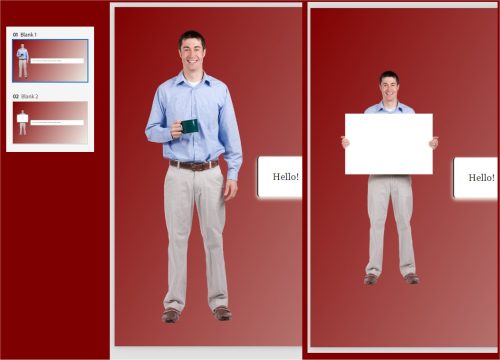
Here is a side by side comparison of two slides in my project. Note how different the character sizes are. I want them to be the same size.
You must be logged in to post a comment.

- Most Recent
- Most Relevant
Hi Tom,
Select the Blue border of the Single character block > You will see an option to stretch the blue bar. Drag it upwards to decrease the size of the character block which will decrease the size of the image as well inserted in the block.
PFA the recording for your reference.
Thanks,
Adobe Support

Thanks for that tip!


