


 Notification



 Newbie
1 posts
Newbie
1 posts


Does anyone know how to turn off ligatures in Adobe Captivate? I can’t find any information on how to do it.
Does anyone know how to turn off ligatures in Adobe Captivate? I can’t find any information on how to do it.
You must be logged in to post a comment.

- Most Recent
- Most Relevant
Hi Lieve, I have attached a screen shot from some of the text in one of my slides. I wan’t to get rid of the joins between “f/i”, “f/t” etc., but can’t figure out how to do it. The font I’m using is Lato and it is an Adobe Typekit font.
Attachment 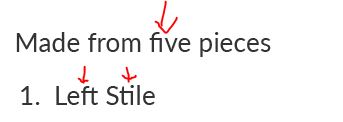

Which font is that? I never did see this type of connections and have created tons of Captivate projects.
It is Lato, and I’ve synced it through Adobe Typekit

I’m afraid you are thinking InDesign or Illustrator. Captivate has very little typographical control. Most Captivate user’s wouldn’t even know what you are asking about.
I wrote something similar about ligatures, but You can edit the distance between characters – so-called kerning – in Captivate with shortcut keys. Have to look it up. That is the only reason why it could be possible to realize what has been shown in the screenshots. When I find some time today will license Lato and see if that font is particularly sensitive to kerning?

In Windows hold down Ctrl + Alt and use the left and right arrows on your keyboard. Although it won’t detach the ligatures in the Lato font.
Paul Wilson thanks for the key command, too bad it doesn’t work for the ligatures. I will let you all know if I ever get to the bottom of this.
Can you give some examples? Maybe my understanding of ‘ligature’ is different from yours, but I don’t see any in Captivate. Which font do you use?


