Close


Search


Blogs

Free Projects
Learning Hub
Tutorials
 Notification
HIGHLIGHT


HIGHLIGHTED
+1
TOC Slide title how to change the name
May 29, 2026

TOC Slide title how to change the name
May 29, 2026
 Explorer
2
2


Summary
Table of Contents has first in the list SLIDE TITLE – DURAATION – I like to change the name to the name of my eLearning – how and where?
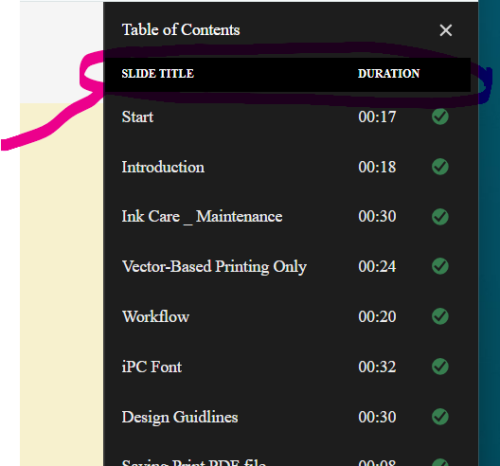
Were do I change SLIDE TITLE to something else?
Were do I change SLIDE TITLE to something else?
You must be logged in to post a comment.
All Comments
Sort by:
Most Recent

- Most Recent
- Most Relevant

2026-07-24 20:38:26
2026-07-24 20:38:26
Either something got lost in translation or Adobe doesn’t even know their own product. You can absolutely change the slide titles in the TOC.
- Click the TOC and Playbar icon.
- It looks like a browser window with a navigation pane/menu.
- Turn on Show TOC
- Double-click a slide to edit its name.
Like
()
2026-06-02 12:20:12
2026-06-02 12:20:12
Hi Jeanette,
Captivate do not have the option to rename “SLIDE TITLE” and “DURATION”.
Thanks,
Adobe Support
Like
(1)

Adobe Captivate
TOC Slide title how to change the name


