


 Notification



 Explorer
2 posts
Explorer
2 posts


Tabs Widget in Horizontal Preview Appears Wrong
Using Tabs Widget in Captivate 13.1.0.197. Referring to Tabs Widget design 1. In Captivate it looks fine, not problem in all views including Mobile Horizontal. BUT when doing a review in the browser. It does not look the same and all text is cramped into the side, as it seems the picture does occupy too much space and size is not fitted, same for fonts size. See attached media. Would appreciate help on this one. Note: this might be only with the first design as another design did not show this problem, but I did not check all 4. Any advice or direction will be appreciated. 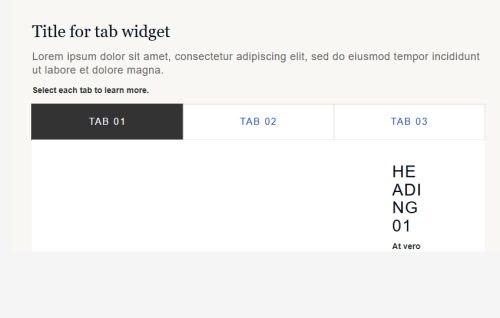
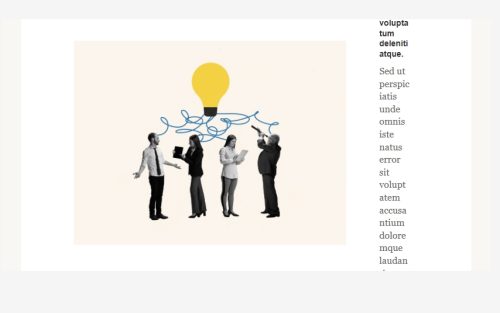
Using Tabs Widget in Captivate 13.1.0.197. Referring to Tabs Widget design 1. In Captivate it looks fine, not problem in all views including Mobile Horizontal. BUT when doing a review in the browser. It does not look the same and all text is cramped into the side, as it seems the picture does occupy too much space and size is not fitted, same for fonts size. See attached media. Would appreciate help on this one. Note: this might be only with the first design as another design did not show this problem, but I did not check all 4. Any advice or direction will be appreciated.
You must be logged in to post a comment.

- Most Recent
- Most Relevant

Hi Moti,
Please update Captivate to 13.1.1 and then check for the issue.
Go to Help menu > Check for updates > Once the update is visible, close the Adobe Captivate app > Select Update now.
Thanks,
Adobe Support
Hi,
Thanks for the reply. I just updated to 13.1.1 and unfortunately it is the same problem.
BR
Moti
Hi Moti Blau,
Thanks for sharing the details and images. It looks like you’ve run into an issue with the Tabs Widget when viewing in the browser. This can sometimes happen if the design doesn’t adapt well outside Captivate’s environment.
Here are a few steps you can try:
1. **Check Responsive Settings:** Ensure that your Tabs Widget is set up for responsive scaling. You might need to adjust the image and text dimensions to fit the browser view better.
2. **Preview in Different Browsers:** Since display issues can vary by browser, try previewing in several (like Chrome, Firefox, etc.) to see if the behavior changes.
3. **Adjust Container Sizes:** Consider resizing the layout containers for images and text to ensure they don’t overlap or become misaligned in browser view.
4. **Explore Other Designs:** As you said, other designs did not show this problem. It may be helpful to switch and test the other designs to find a more stable option if resizing doesn’t work.
You can find more insights on setting up and troubleshooting widgets in Captivate by visiting [this HelpX article](https://helpx.adobe.com/in/captivate/user-guide.html).
If these suggestions don’t help, please share more about your Captivate version, operating system, and browser types, or reach out to captivatehelp@adobe.com with screenshots and a description.
Best,
Shreya
Hi Shreya,
Thanks for all the suggestions. I have tried them all. Nothing helps.
Let me suggest you make a new project with just an empty slide and one tab widget and test it.
I will send a detailed e-mail.
Thanks!
Moti


