


 Notification



 Master


We’re excited to share Adobe Captivate 13.2, our latest minor release.
While this isn’t a major feature release, it brings together a set of meaningful enhancements that make everyday authoring smoother; from a better Avatar (AI Narrator) experience and stronger accessibility to smoother project upgrades and important quality and stability fixes.
We’ve been listening closely to how authors use Captivate every day, what saves time, what creates friction, and where seemingly small improvements can make a real difference. That thinking shaped Adobe Captivate 13.2.
Here are a few highlights:
Avatars just got much easier to manage:
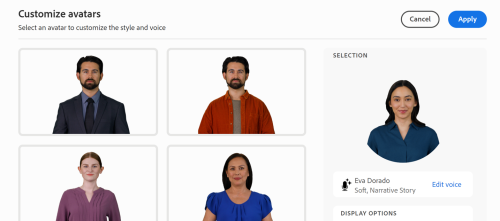
If you’re using Avatars (AI Narrators) across multiple slides, you’ll appreciate this one. You can now manage Avatar settings globally across your project. Set things up once, keep the experience consistent, and avoid making the same changes slide after slide.
Need a particular slide to be different? No problem. You can still override the Avatar settings at the individual slide level. It’s a simple change, but for projects that make extensive use of AI Narrators, it can mean a lot less repetitive work.
A big step forward for accessibility:

Captivate 13.2 is now certified for WCAG 2.2 Level AA compliance, marking an important milestone in our accessibility journey. Click here to view the Adobe Captivate Accessibility Conformance Report.
This is an area we continue to invest in, and Captivate 13.2 brings some meaningful improvements. We’ve enhanced screen reader support, keyboard navigation, focus indicators, heading structure, and support for assistive technologies. There’s always more work to do when it comes to accessibility, but we’re excited about the progress in this release and remain committed to making Captivate more inclusive and accessible for everyone. Ultimately, we want to empower authors to create learning experiences that are easier to navigate and more inclusive for all learners.
Upgrading existing projects? We’ve made that smoother too:

Nobody wants to upgrade a project and then spend time recreating customizations they’ve already made. With Captivate 13.2, projects upgraded from previous versions now retain Avatar customizations more effectively.
That means a smoother transition to the latest release and less time spent fixing things after an upgrade.
And yes, we squashed quite a few bugs:

A release isn’t just about shiny new capabilities. We’ve also addressed issues across authoring, publishing, LMS playback, accessibility, review links, and text-to-speech workflows.
Some of these improvements may not grab the headline, but they add up to something that matters; a smoother and more dependable Captivate experience.
Ready to try it out?
Click here to dive into the latest version (Windows and macOS ) and experience the magic of Adobe Captivate 13.2 for yourself. Your next great learning experience is just a few clicks away!
New to Captivate, try the free 30-day-trial:
You can also download a free 30-day trial of this update. Credit card information is NOT required.
We value your feedback!
If you encounter any issues or have suggestions for future improvements, please don’t hesitate to contact support at CaptivateHelp@adobe.com, tcssup@adobe.com or submit your enhancement request at the Adobe Captivate UserVoice page.
We’re excited for you to explore the new features and enhancements in Adobe Captivate 13.2, and we look forward to hearing about your experiences. Stay tuned for more updates and thank you for choosing Adobe Captivate.
Cheers!
Sharath Ramaswamy
Principal Evangelist for Adobe Captivate
Avatars just got much easier to manage:
If you’re using Avatars (AI Narrators) across multiple slides, you’ll appreciate this one. You can now manage Avatar settings globally across your project. Set things up once, keep the experience consistent, and avoid making the same changes slide after slide.
Need a particular slide to be different? No problem. You can still override the Avatar settings at the individual slide level. It’s a simple change, but for projects that make extensive use of AI Narrators, it can mean a lot less repetitive work.
A big step forward for accessibility:
Captivate 13.2 is now certified for WCAG 2.2 Level AA compliance, marking an important milestone in our accessibility journey. Click here to view the Adobe Captivate Accessibility Conformance Report.
This is an area we continue to invest in, and Captivate 13.2 brings some meaningful improvements. We’ve enhanced screen reader support, keyboard navigation, focus indicators, heading structure, and support for assistive technologies. There’s always more work to do when it comes to accessibility, but we’re excited about the progress in this release and remain committed to making Captivate more inclusive and accessible for everyone. Ultimately, we want to empower authors to create learning experiences that are easier to navigate and more inclusive for all learners.
Upgrading existing projects? We’ve made that smoother too:
Nobody wants to upgrade a project and then spend time recreating customizations they’ve already made. With Captivate 13.2, projects upgraded from previous versions now retain Avatar customizations more effectively.
That means a smoother transition to the latest release and less time spent fixing things after an upgrade.
And yes, we squashed quite a few bugs:
A release isn’t just about shiny new capabilities. We’ve also addressed issues across authoring, publishing, LMS playback, accessibility, review links, and text-to-speech workflows.
Some of these improvements may not grab the headline, but they add up to something that matters; a smoother and more dependable Captivate experience.
Ready to try it out?
Click here to dive into the latest version (Windows and macOS ) and experience the magic of Adobe Captivate 13.2 for yourself. Your next great learning experience is just a few clicks away!
New to Captivate, try the free 30-day-trial:
You can also download a free 30-day trial of this update. Credit card information is NOT required.
We value your feedback!
If you encounter any issues or have suggestions for future improvements, please don’t hesitate to contact support at CaptivateHelp@adobe.com, tcssup@adobe.com or submit your enhancement request at the Adobe Captivate UserVoice page.
We’re excited for you to explore the new features and enhancements in Adobe Captivate 13.2, and we look forward to hearing about your experiences. Stay tuned for more updates and thank you for choosing Adobe Captivate.
Cheers!
Sharath Ramaswamy
Principal Evangelist for Adobe Captivate
You must be logged in to post a comment.

- Most Recent
- Most Relevant

Will Import project from Classic Captivate file work with this release? In version 13.1.1.200, we are unable to select a project file to import. Has that been fixed?


