


 Notification



 Newbie


Unable to import Captivate Classic files into Captivate 13.1.
I recently installed the new update to Captivate, and when I attempted to test the Captivate Classic Import tool, it did not work. I selected Import > Captivate Classic Import and it just spins forever. I can’t choose a file to import or back out of this process. I had to close and reopen Captivate.
I selected “Learn more,” and it landed on a 404 page.
Has anyone successfully converted a Classic file to the new Captivate format?
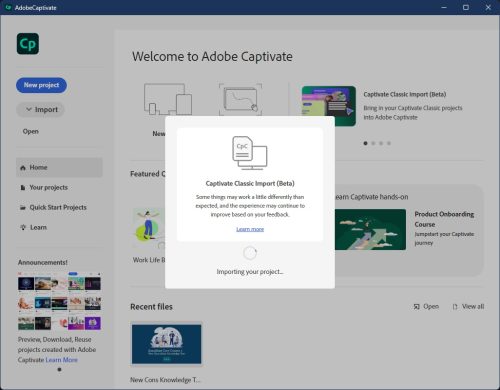
I recently installed the new update to Captivate, and when I attempted to test the Captivate Classic Import tool, it did not work. I selected Import > Captivate Classic Import and it just spins forever. I can’t choose a file to import or back out of this process. I had to close and reopen Captivate.
I selected “Learn more,” and it landed on a 404 page.
Has anyone successfully converted a Classic file to the new Captivate format?
You must be logged in to post a comment.

- Most Recent
- Most Relevant
Hi,
Thank you for your query.
Please provide the information below so we can get more details around the issue and assist accordingly: –
– What is the point version of Adobe Captivate on your device? You may check that from Help->About Adobe Captivate
– Which Operating system and version are you using?
– Are the Captivate project files saved locally or on a network/shared drive?
– Is it a work computer or personal machine? If work, does the user account has admin access or local access?
– Are you experiencing this issue with a specific Captivate project or all files?
– Did it work fine for you previously on this device?
Please feel free to write back in case of any further concerns.You may also contact the technical support team directly via phone (+1-800-833-6687) or chat ( https://www.adobe.com/getsupport) for immediate assistance
Here to help,
Adobe Captivate Support
Thanks for the response. When will the import be available as a stable release (not beta)? When will it be able to migrate responsiveness and drag-drop-interactions?
I’m also looking forward to the answer to the experiences this user shares:
https://elearning.adobe.com/2026/05/issues-with-captivate-classic-file-import-to-captivate-13-1/
Thanks for the response. When will the import be available as a stable release (not beta)? When will it be able to migrate responsiveness and drag-drop-interactions?
I’m also looking forward to the answer to the experiences shared by this user:
https://elearning.adobe.com/2026/05/issues-with-captivate-classic-file-import-to-captivate-13-1/
Hi TorleifD,
At this time, we do not have an estimated timeline to share regarding when the Captivate Classic import functionality will transition out of beta status. The import capability is actively being developed and enhanced, and customer feedback plays an important role in helping the product team prioritize future improvements.
As new functionality becomes available, details will be communicated through official Adobe channels, including product release notes, documentation updates, and other Adobe Captivate resources.
Here to help,
Adobe Captivate Support
Hello again – does version 13.2 support responsiveness and drag-drop, or do you now have an estimate for when it would be available?


